
This website contains materials from a past semester. Information, assignments, and announcements may no longer be relevant. Please refer to the current semester's site for up-to-date content.
Background
The infrastructure is similar to Lab 2, with the new addition of a new processor: BOOM.
BOOM: Berkeley Out-of-Order Machine
The Berkeley Out-of-Order Machine (BOOM) is a synthesizable, parameterized, out-of-order superscalar RISC-V core. It is a unified physical register file design (also known as explicit register renaming) with a split ROB and issue window. To build an SoC with a BOOM core, BOOM utilizes the Rocket Chip SoC generator as a library to reuse different microarchitectural components (TLBs, PTWs, etc).
Pipeline
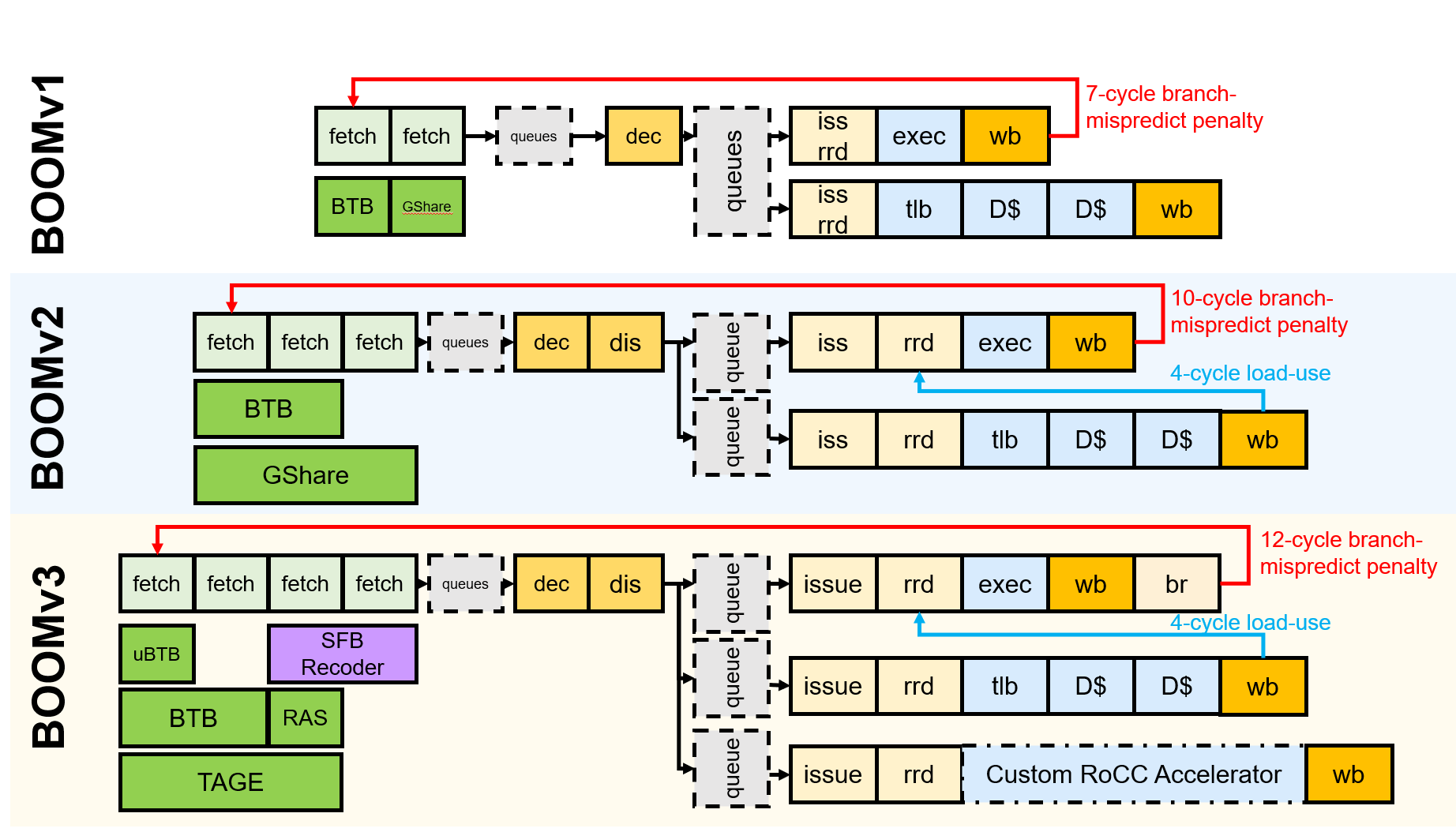
Conceptually, BOOM is divided into 10 stages: Fetch, Decode, Register Rename, Dispatch, Issue, Register Read, Execute, Memory, Writeback and Commit. However, some of those stages are combined in the current implementation. Additionally, some of these stages are pipelined across multiple pipeline stages.
Fetch
Instructions are fetched from instruction memory and pushed into a FIFO queue, known as the Fetch Buffer. Instruction pre-decode is performed, to find alignments of 16-bit vs 32-bit instructions. Branch prediction also occurs in this stage, redirecting the fetched instructions as necessary.
Decode
Decode pulls instructions out of the Fetch Buffer and generates the appropriate “micro-ops” (μops) to place into the pipeline.1
Rename
The ISA, or “logical”, register specifiers (e.g. x0-x31) are then renamed into “physical” register specifiers.
Dispatch
The μop is then dispatched, or written, into a set of Issue Queues.
Issue
μops sitting in an Issue Queue wait until all of their operands are ready and are then issued. This is the beginning of the out-of-order portion of the pipeline.2
Register Read
Issued μops first read their register operands from the unified Physical Register File or from the Bypass Network.
Execute
μops then enter the Execute stage where the functional units reside. Issued memory operations perform their address calculations in the Execute stage, and then store the calculated addresses in the Load/Store Unit which resides in the Memory stage.
Memory
The Load/Store Unit consists of two queues: a Load Address Queue (LDQ), and a Store Queue (STQ). Loads are fired to memory when their address is present in the LDQ. Stores are fired to memory at Commit time (and naturally, stores cannot be committed until both their address and data have been placed in the STQ).
Writeback
ALU and load results are written back to the Physical Register File.
Commit
The Reorder Buffer (ROB), tracks the status of each instruction in the pipeline. When the head of the ROB is not-busy, the ROB commits the instruction. For stores, the ROB signals to the store at the head of the Store Queue (STQ) that it can now write its data to memory.
Branch Support
BOOM supports full branch speculation and branch prediction. Each instruction, no matter where it is in the pipeline, is accompanied by a Branch Tag that marks which branches the instruction is speculated under. A mispredicted branch requires killing all instructions that depended on that branch. When a branch instructions passes through Rename, copies of the Register Rename Table and the Free List are made. On a mispredict, the saved processor state is restored.
Chipyard
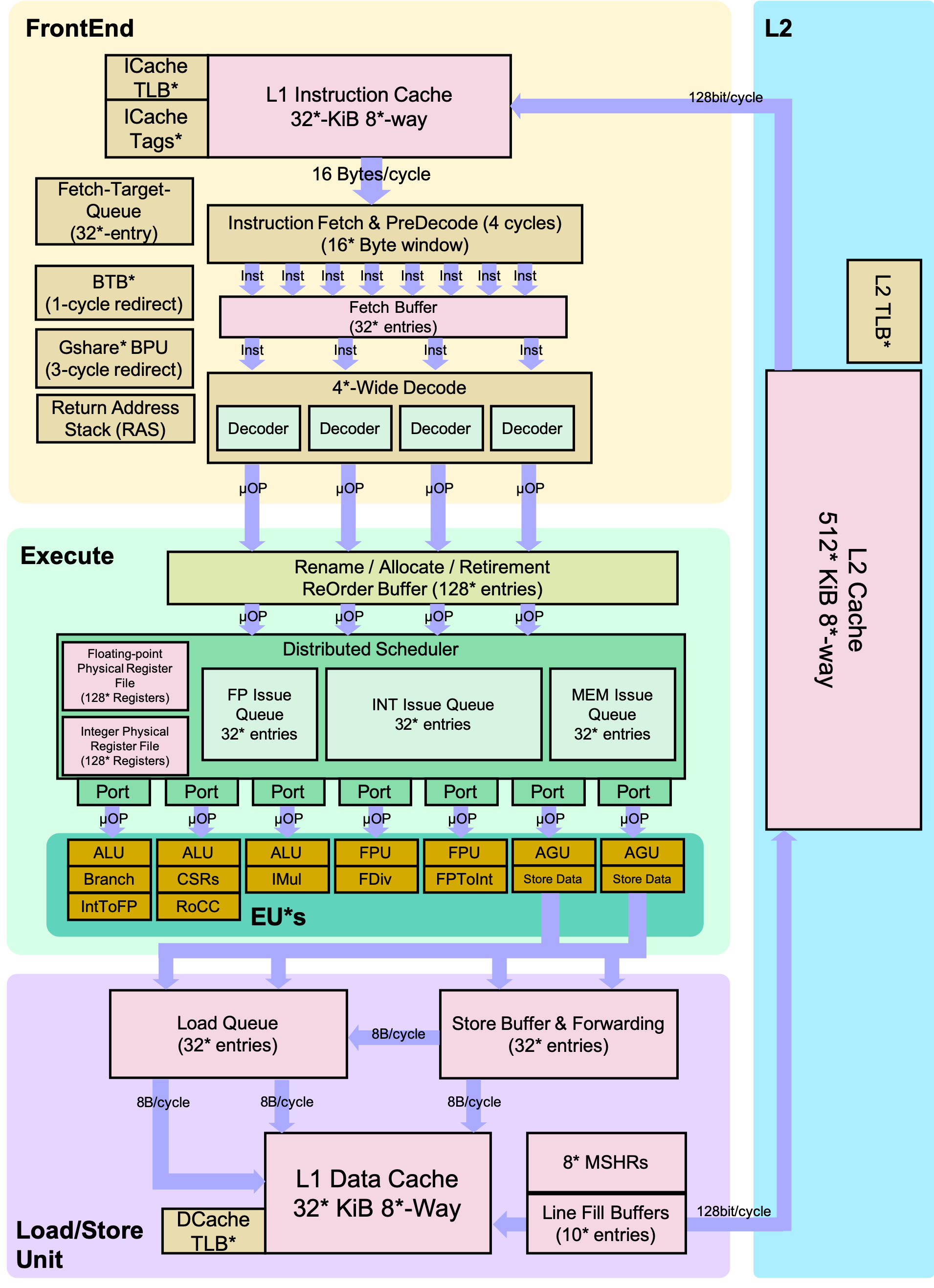
Chipyard is an integrated design, simulation, and implementation framework for agile development of systems-on-chip (SoCs). It combines Chisel, the Rocket Chip generator, and other Berkeley projects to produce a full-featured RISC-V SoC from a rich library of processor cores, accelerators, memory system components, and I/O peripherals.
Directed Portion (20%)
Terminology and Conventions
Throughout this course, the term host refers to the machine on which the simulation runs, while target refers to the machine being simulated. For this lab, an instructional server will act as the host, and the RISC-V processors will be the target machines.
Unix shell commands to be run on the host are prefixed with the prompt “”.
Setup
To complete this lab, we recommend that you ssh into an instructional server with the instructional computing account provided to you. The lab infrastructure has been set up to run on the eda{1..3}.eecs.berkeley.edu machines (eda-1.eecs, eda-2.eecs, etc.).
Once logged in, clone the new lab materials into an appropriate workspace and initialize the submodules.
cd ~ # go to your home directory
rm -rf cs152-lab2-sp26 # remove lab2 chipyard directory
source ~/conda/etc/profile.d/conda.sh
ln -s /home/ff/cs152/sp26/chipyard/.conda-env .conda-env
conda activate .conda-env/
git clone https://github.com/cs152-teach/chipyard-cs152.git cs152-lab3-sp26
cd cs152-lab3-sp26
git checkout sp26-lab3
./build-setup.sh riscv-tools --skip-conda --skip-toolchain --skip-circt --skip-firesim --skip-marshal
Then, run
export LAB3ROOT=$(pwd)
source env.sh
After setting up the repository, you must setup the Chipyard environment whenever you open a new terminal.
cd ~ # go to your home directory
source ~/conda/etc/profile.d/conda.sh
conda activate .conda-env/
cd cs152-lab3-sp26
export LAB3ROOT=$(pwd)
source env.sh
The remainder of this lab will use ${LAB3ROOT} to denote the path of the working tree. Its directory structure is outlined below:
Source code for Problem 4.2Library of RTL generatorsSoC configurations Rocket Chip generator BOOM core SiFive’s inclusive L2 cache RTL blocks for interfacing with test chipsVerilator simulation flow Synopsys VCS simulation flowCollection of common FIRRTL transformations
Performance Bottlenecks
Building an out-of-order processor is hard. Building an out-of-order processor that is well balanced and high performance is really hard. Any one component of the processor can bottleneck the machine and lead to poor performance.
For this problem, you will set the parameters of the processor to a low-end “worst-case” baseline (Table 1) and incrementally introduce features. While some of these structures are on the small side, the machine should generally remain well-fed since only one instruction is dispatched and issued at a time, and the pipeline is not exceptionally deep.
| Worst-Case | Improved | |
|---|---|---|
| Physical Register File | 33 | 64 |
| Reorder Buffer | 4 | 16 |
| Branch Prediction | disabled | BTB, BHT, 8-entry RAS |
BOOM worst-case versus improved configurations
Collect and report the CPI numbers for the following benchmarks. Results for the in-order Rocket core has been provided for you. Note: Since the compile and simulation times can be fairly significant, you may gather the data in collaboration with other students and share them, but the questions must be answered independently.
dhrystone |
median |
multiply |
qsort |
spmv |
towers |
vvadd |
|
|---|---|---|---|---|---|---|---|
| Rocket | 1.200 | 1.379 | 1.136 | 1.427 | 1.690 | 1.029 | 1.024 |
| BOOM (worst-case) | |||||||
| BOOM (64 PRF) | |||||||
| BOOM (16 ROB) | |||||||
| BOOM (br. pred.) |
Navigate to ${LAB3ROOT}/generators/boom/src/main/scala/common/config-mixins.scala and search for the definition of the WithNCS152BaselineBooms config. First simulate with the default parameters, which should correspond to the “worst-case” settings. As you move down the rows of the table, change the parameters to match while retaining the features from the previous rows.
For each design point, build the simulator and run the benchmarks in a batch.3
cd ${LAB3ROOT}/sims/verilator
make CONFIG=CS152BaselineBoomConfig
make CONFIG=CS152BaselineBoomConfig run-bmark-tests
cd output/chipyard.harness.TestHarness.CS152BaselineBoomConfig
In the output directory, review the files (one per benchmark) for the cycle and retired instruction counts. Also record the branch prediction accuracies summarized at the end of the files.
Format the data in a chart or table, and answer the following questions in your report:
Feedback Portion
In order to improve the labs for the next offering of this course, we would like your feedback. Please append your feedback to your individual report for the directed portion. These questions are also placed at the bottom of the open-ended part of the lab for your convenience.
-
How many hours did you spend on the directed and open-ended portions?
-
What did you dislike most about the lab?
-
What did you like most about the lab?
-
Is there anything that you would change?
-
Is there something else you would like to explore in the open-ended portion?
-
Are you interested in modifying hardware designs as part of the lab?
Feel free to write as much or as little as you prefer (a point will be deducted only if left completely empty).
Team Feedback
In addition to feedback on the lab itself, please answer a few questions about your team:
-
In one short paragraph, describe your contributions to the project.
-
Describe the contribution of each of your team members.
-
Do you think that every member of the team contributed fairly? If not, why?
-
Because RISC-V is a RISC ISA, currently all instructions generate only a single μop. ↩
-
More precisely, μops that are ready assert their request, and the issue scheduler within the Issue Queue chooses which μops to issue that cycle. ↩
-
You can build and run the simulator in parallel by adding the
-j$N$ flag to themakecommand, but refrain from spawning an excessive number of jobs so as to be fair to other users. $N = 4$ is probably acceptable. ↩